SpellCrafting Rep Bot Released [With Video Tutorial]This bot is useful for rank up "Spellcrafting Rep" and unlock "spellcrafting rep shop" Preview :
Tools :GhostMouse (mediafire)Ember Ink Bot [2500 SpellCrafting Rep]Require : x10 Ember Ink (mediafire)Runic Ink Bot [6400 SpellCrafting Rep]Require : x10 Runic Ink, Rank 2 SpellCrafting (mediafire)Elemental Ink Bot [10800 SpellCrafting Rep]Require : x10 Elemental Ink, Rank 3 SpellCrafting (mediafire)Hallow Ink Bot [25500 SpellCrafting Rep]Require : x10 Hallow Ink, Rank 4 SpellCrafting (Legend Only) (mediafire)Zealous Ink Bot [13750 SpellCrafting Rep]Require : x10 Zealous Ink, Rank 5 SpellCrafting (mediafire)Archmage Ink Bot [20000 SpellCrafting Rep]Require : x10 Archmage Ink, Rank 8 SpellCrafting (mediafire)Attention! Steps :
====English====
1. Extract All Spell Ink Bot from Rar file2. Open Le Bot (full screen) and Login your account3. /join spellcraft and buy x10 Spell Ink required4. then, return to the initial menu when they want to do spell ink 5. Open GhostMouse6. Move GhostMouse to sideways7. Click File => Open => Choose your Spell Ink Bot 8. Click play on GhostMouse9. Mouse will move itself until x10 Inscribe10. Repeat it until rank 10
====Indonesia====
1. Ekstrak Semua Spell Ink Bot dari file Rar
2. Buka Le Bot (layar penuh) dan Login account Anda
3. /join spellcraft dan beli x10 Eja Ink yang diperlukan4. Lalu kembali ke menu awal saat akan melakukan spell ink 5. Buka GhostMouse 6. Pindahkan GhostMouse ke samping7. Klik File => open => Pilih spell Ink bot anda8. Klik bermain di GhostMouse9. Mouse akan bergerak sendiri sampai x10 Inscribe10. Ulangi sampai rank 10Watch this Video for more details !
All Reputations Bot in DragonRune Released This bot is useful for unlock "Necro Crypt Rep Shop" , "Druid Grove Rep Shop" and "Elemental Master Rep Shop"Preview :
Tools :Necro Crypt Rep Bot (mediafire)Druid Grove Rep Bot (mediafire)Elemental Master Rep Bot (mediafire)Attention! Steps :
====English====
- Extract the files in a folder
- Open any trainer that can load dmbot files
- Open Bot Manager
- Load the file(s)
- Don't forget to customize your skill in Skill class on options How to Customize Skill Class (Eng/Ind)
- Click Enable in Bot Manager
- Open Auto Relogin and choose the server and then checklist auto relogin [follow this step (step 7) if you're using bot in a long time]
- Open Options and checklist "Resume Bot Man." and "Lag Killer" [follow this step (step 8) if you're using botin a long time]
====Indonesia====
- Extract file di sebuah folder
- Buka trainer yang dapat meload dmbot files
- Buka Bot Manager
- Load file bot
- Jangan lupa untuk mengatur skill class di options How to Customize Skill Class (Eng/Ind)
- klik Enable di Bot Manager
- Buka Auto Relogin dan pilih server dan kemudian centang "auto relogin" [ikuti langkah ini (langkah 7) jika Anda menggunakan bot dalam waktu yang lama]
- Buka Options dan centang "Resume Bot Man." dan "Lag Killer" [ikuti langkah ini (langkah 8) jika Anda menggunakan bot dalam waktu yang lama]
Fiend Token Bot Released This bot is useful for obtain a "Legendary ArchFiend Set" Preview : 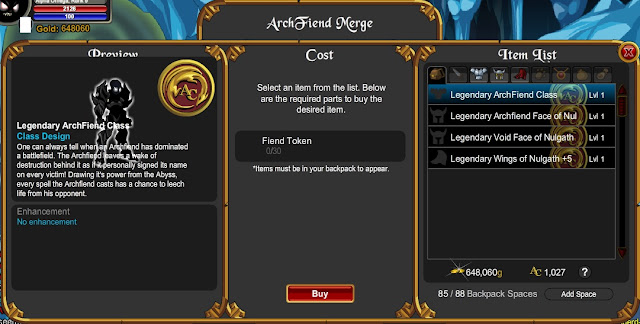 Tools :Diamond of Nulgath (Mana Golem-Elemental and Mana Elemental-Gilead) (mediafire)Recommended : Fight Mana Golem until you get as much as possible (x10++) Mana Energy for Nulgath in Elemental before you go to Gilead for Charged Mana Energy for Nulgath NB : Mana Energy for Nulgath is Temporary Item. if you close Le Bot/Disconnect connection, it's will disappearFiend Token Bot (without Diamond of Nulgath) [Auto Get Fiend Token Fixed 03/08/2013 10:05 WIB] (mediafire)NB : you must get as much as possible Diamond of Nulgath before using Fiend Token BotAttention! Steps :
====English====
- Extract the files in a folder
- Open any trainer that can load dmbot files
- Open Bot Manager
- Load the file(s)
- Don't forget to customize your skill in Skill class on options How to Customize Skill Class (Eng/Ind)
- Click Enable in Bot Manager
- Open Auto Relogin and choose the server and then checklist auto relogin [follow this step (step 7) if you're using bot in a long time]
- Open Options and checklist "Resume Bot Man." and "Lag Killer" [follow this step (step 8) if you're using botin a long time]
====Indonesia====
- Extract file di sebuah folder
- Buka trainer yang dapat meload dmbot files
- Buka Bot Manager
- Load file bot
- Jangan lupa untuk mengatur skill class di options How to Customize Skill Class (Eng/Ind)
- klik Enable di Bot Manager
- Buka Auto Relogin dan pilih server dan kemudian centang "auto relogin" [ikuti langkah ini (langkah 7) jika Anda menggunakan bot dalam waktu yang lama]
- Buka Options dan centang "Resume Bot Man." dan "Lag Killer" [ikuti langkah ini (langkah 8) jika Anda menggunakan bot dalam waktu yang lama]


